
Apple introduces new AirTag: Apple has done it again — and this time, almost without warning. Instead of releasing the widely expected iOS 26.3, Apple has suddenly rolled out iOS 26.2.1, a minor update that’s far more interesting than its version number suggests.
At first glance, iOS 26.2.1 looks like a routine maintenance release. However, once you dig in, it becomes clear this update is different. Not only does it introduce new functionality, but it also breaks a long-standing Apple tradition by shipping without any published security patches — a rare move that raises eyebrows across the iPhone community.
So, what’s really going on here? Let’s break it all down.
Which iPhones Support iOS 26.2.1?
First and foremost, compatibility won’t be an issue for most users. Apple has made iOS 26.2.1 available for all iPhones released from 2019 onward.
Specifically, the update supports:
- iPhone 11 series and newer
- iPhone SE (2nd and 3rd generation)
- Every model in the iPhone 17 lineup
Meanwhile, older devices like the iPhone XS, XS Max, and XR are excluded, as they cannot run iOS 26. Instead, Apple has issued iOS 18.7.4 for those models — a clear sign that iOS 18 has reached the end of the road.
How to Download and Install iOS 26.2.1
Fortunately, installing the update is quick and straightforward.
To get started:
- Open Settings
- Tap General
- Select Software Update
- Choose Download and Install
Although the update isn’t tiny, it’s still manageable. On an iPhone 17 Pro Max, it weighs in at roughly 839MB. Even so, the entire process — download to restart — typically takes under 10 minutes.
What’s Actually New in iOS 26.2.1?
Normally, updates ending in “.1” focus almost exclusively on bug fixes. However, this time Apple had a very specific reason to push out a new build.
According to Apple’s official release notes, iOS 26.2.1:
“Provides support for AirTag (2nd generation) along with bug fixes.”
While that statement sounds modest, it hides a much bigger story.
The Real Reason for iOS 26.2.1: AirTag (2nd Generation)
Earlier this week, Apple unexpectedly unveiled the second-generation AirTag — and it’s a meaningful upgrade.
Because this new AirTag introduces updated hardware, Apple needed a software update to unlock its full potential. As a result, iOS 26.2.1 exists largely to make sure everything works seamlessly.
What’s New With AirTag (2nd Gen)?
The latest AirTag brings several notable improvements:
- Second-generation Ultra Wideband chip, offering up to 50% greater Precision Finding range
- Upgraded Bluetooth, increasing detection distance
- New, distinctive chime that’s easier to recognize
- Speaker that’s 50% louder, making lost items easier to hear
- Support for child-safe batteries, addressing a long-standing concern
Together, these changes make the new AirTag significantly easier to locate — whether it’s buried in couch cushions or lost halfway across an airport.
Apple Watch Support Takes AirTag Finding to the Wrist
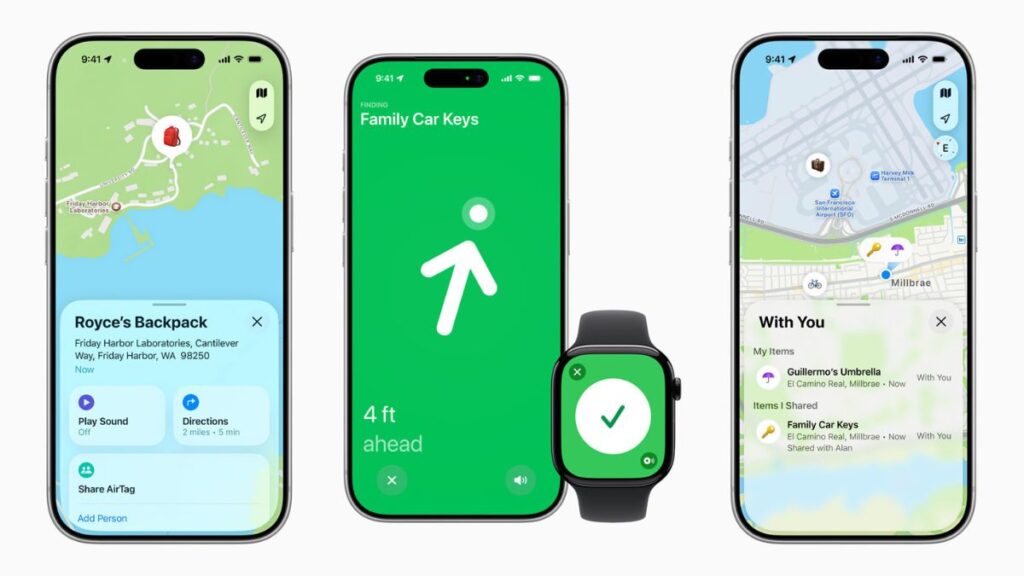
For the first time, Precision Finding isn’t limited to the iPhone.
With compatible hardware, users can now locate AirTags directly from:
- Apple Watch Series 9 or later
- Apple Watch Ultra 2 or later
This enhancement adds convenience, especially when your iPhone isn’t immediately within reach. Naturally, iOS 26.2.1 is required to enable this feature.
Find My Network and Share Item Location: Why This Matters More Than Ever
Beyond hardware upgrades, Apple continues to strengthen the Find My network, which remains one of the most powerful crowdsourced location systems in the world.
If an AirTag is out of Bluetooth range, nearby Apple devices can anonymously relay its approximate location back to the owner — all while preserving user privacy.
More importantly, Apple’s Share Item Location feature is now deeply integrated with AirTag tracking.
Airlines, Luggage, and Faster Recoveries
Thanks to partnerships with over 50 airlines, users can temporarily share an item’s location with airline staff when luggage goes missing.
According to SITA:
- Baggage delays have dropped by 26%
- “Truly lost” luggage incidents have fallen by 90%
Access is strictly controlled, time-limited, and automatically expires after seven days — or sooner if the item is recovered.
Why Updating to iOS 26 Is More Important Than It Looks
While iPhones from the iPhone 11 through iPhone 16 technically still run iOS 18, Apple has stopped delivering regular updates for that version.
In other words:
- iOS 18 is effectively finished
- iOS 26 is now the active, supported platform
Therefore, if your device supports iOS 26, staying on an older version means missing future fixes, features, and compatibility updates.
The Biggest Surprise: No Security Updates at All
Here’s where things get truly unusual.
Typically, even the smallest iOS updates include security patches. Apple usually publishes a list of CVE entries shortly after release. However, for iOS 26.2.1, Apple explicitly states:
“This update has no published CVE entries.”
That means no disclosed security fixes — a rare move that suggests this release was rushed out specifically to support new hardware rather than address vulnerabilities.
While there’s no immediate cause for concern, it does make this update an outlier in Apple’s release history.
Final Verdict: A Small Update With Bigger Implications
At face value, iOS 26.2.1 may look minor. However, once you understand the context, its importance becomes clear.
This update:
- Enables next-generation AirTag features
- Expands Precision Finding to Apple Watch
- Signals the end of the iOS 18 era
- Breaks Apple’s usual pattern by shipping without security patches
In short, iOS 26.2.1 isn’t about flashy software changes — it’s about preparing the ecosystem for Apple’s latest hardware and services.
If your iPhone supports it, updating now is a smart move — not because you have to, but because Apple is clearly steering everything forward from here.
Frequently Asked Questions (FAQs)
1. Why Apple introduces new AirTag alongside the iOS 26.2.1 update?
Apple introduces new AirTag at the same time as iOS 26.2.1 because the second-generation AirTag relies on new system-level support. The update ensures seamless compatibility, enabling enhanced Precision Finding, louder audio alerts, and improved Bluetooth performance across supported devices.
2. What makes the moment Apple introduces new AirTag significant for iPhone users?
When Apple introduces new AirTag, it marks a meaningful upgrade rather than a minor refresh. The new model delivers longer finding range, a louder speaker, and tighter integration with the Find My ecosystem, making it easier than ever to locate everyday items.
3. Which iPhones support the update required after Apple introduces new AirTag?
After Apple introduces new AirTag, support is extended to all iPhones released from 2019 onward. This includes the iPhone 11 series, iPhone SE (2nd and 3rd generation), and all iPhone 17 models running iOS 26.
4. Does Apple introduces new AirTag mean older iPhones are no longer supported?
Not exactly. While Apple introduces new AirTag with iOS 26 support, older devices like the iPhone XS, XS Max, and XR remain on iOS 18. However, those models will not gain compatibility with the new AirTag features.
5. What new tracking capabilities arrive when Apple introduces new AirTag?
When Apple introduces new AirTag, users benefit from a second-generation Ultra Wideband chip that extends Precision Finding by up to 50 percent. Additionally, an upgraded Bluetooth chip increases detection range when items are farther away.
6. How does Apple introduces new AirTag improve finding lost items indoors?
Apple introduces new AirTag with a redesigned internal speaker that is 50 percent louder and produces a distinctive new chime. As a result, items hidden under furniture or inside bags are much easier to locate using sound cues.
7. What role does Apple Watch play now that Apple introduces new AirTag?
Since Apple introduces new AirTag, Precision Finding is no longer limited to the iPhone. Users with Apple Watch Series 9 or later, or Apple Watch Ultra 2 or later, can locate AirTags directly from their wrist for added convenience.
8. How does privacy remain protected when Apple introduces new AirTag?
Even as Apple introduces new AirTag with expanded range, privacy remains central. Location data is end-to-end encrypted, anonymous, and never shared with Apple, ensuring users retain full control over their information.
9. Why does Apple introduces new AirTag strengthen the Find My network?
Apple introduces new AirTag to take fuller advantage of the global Find My network. Nearby Apple devices can securely relay location signals, dramatically increasing the chances of recovering lost items without compromising user privacy.
10. How does airline luggage recovery improve after Apple introduces new AirTag?
After Apple introduces new AirTag, users can securely share item locations with participating airlines through Share Item Location. With over 50 airline partners, this feature has significantly reduced baggage delays and unrecoverable luggage incidents.
11. Why is the update unusual even though Apple introduces new AirTag?
Although Apple introduces new AirTag via iOS 26.2.1, the update contains no published security patches. This is unusual, as most iOS releases include security fixes, highlighting that this update is primarily focused on hardware support.
12. Should users update immediately now that Apple introduces new AirTag?
Yes. Once Apple introduces new AirTag, updating to iOS 26.2.1 is strongly recommended for compatible devices. Doing so ensures access to the latest tracking features, long-term software support, and full ecosystem compatibility.